Save from anywhere
Copy, tap Share, or drop a file. Kept in full.
Three steps — and nobody in the middle.
Copy, tap Share or drop a file. Kept in full.
Copy, tap Share, or drop a file. Kept in full.
Even two-character words.
30 days to undo — on every device.
Device to device, encrypted. No account, no cloud.
Device to device. Encrypted. No cloud.
Both versions are kept until you choose.
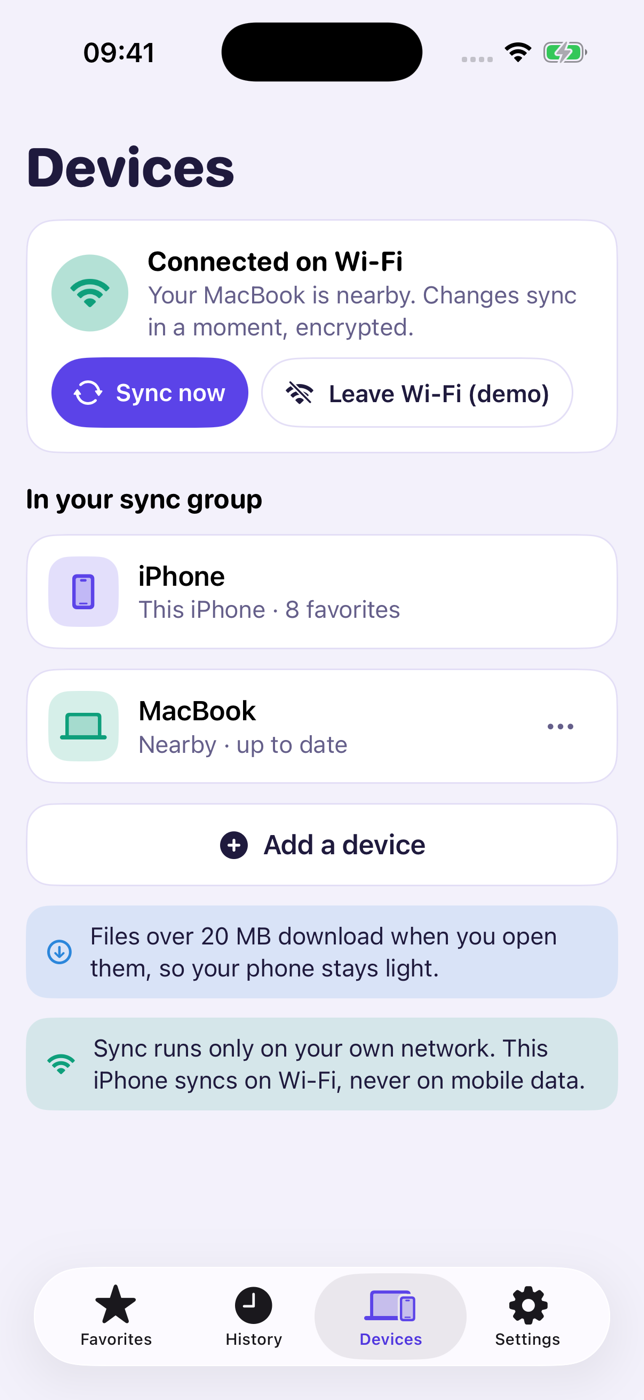
Over 20 MB downloads when you open it.
Never on mobile data. Catches up on Wi-Fi.
History is kept apart by construction, not by a filter. It lives in its own database file, and the sync engine is never given access to it. Pre-release tests inspect every message that crosses the network to confirm that no History item is ever in it.
Everyone in the group sees every favorite. In this version there is one personal group, and all favorites go to every device in it. Only add devices you own.
Your first device creates a personal sync group, and you choose a group password once. To add another device, you type that password on it while it can reach any device already in the group.
The new device finds your Mac with Bonjour, or you type its address. Both screens show the same short code, so you know you picked the right one.
Both sides run the key exchange. It only succeeds if they used the same password, and each side confirms the other.
Inside that confirmed channel, the new device receives the group settings and the member list, and is added to the list with its own public keys.
Every later connection is authenticated by device keys. The password isn't used again for syncing.
Devices in your group talk to each other directly. Nothing sits in the middle, so there is nothing in the middle to trust.
Each device creates its own signing and encryption keys on first launch. They are stored in the Keychain for this device only, and never synced to iCloud.
Sync runs in a Noise XX session (X25519, ChaCha20-Poly1305, BLAKE2s). Both devices prove who they are, and a device from another group can't complete the handshake.
Sync happens on your Wi-Fi or Ethernet, and it works without an internet connection. iPhones sync on Wi-Fi only, never on mobile data.
Bonjour adverts carry only what's needed to connect: a device name and type, a short pairing code and a group tag that changes every day. Never a favorite, never History.
There is no FaveShare server to sign in to, and nothing is reported back to us. Logs never contain the text of what you copied or saved.
Every device checks the type, size and path of whatever it receives, so a member can't write files outside FaveShare's own folders.
Membership is a list that every member signs and shares. A device admitted by any member is trusted by all — and a device removed by any member is removed everywhere.
What removal doesn't do. There is no remote erase. A removed device stops syncing, but it keeps the favorites it had already received. If a device is lost or stolen, remove it and change the password — and treat what was on it as exposed.
Files are stored by their SHA-256 fingerprint, so identical files are kept once. Transfers stream in chunks, resume where they stopped, and a file only counts as saved once its fingerprint matches. Running out of disk pauses a transfer; it never leaves a broken favorite.
Each favorite carries a version vector stamped with a hybrid logical clock, so FaveShare can tell a later edit from one made at the same time, without trusting device clocks. If two devices edit the same note while apart, you get “Edited on both devices” and choose — nothing is silently overwritten.
Deleted favorites sit in Recently deleted for 30 days on every device. Permanent deletions leave a durable marker, so a device that was offline for weeks can't bring them back. A device away for 90 days or more fully reconciles before it sends any changes.
Devices agree on a protocol version when they connect and keep fields they don't understand. If two devices have no version in common, sync with that device pauses and asks you to update FaveShare — data is never dropped or rewritten.
The Mac and iPhone apps are native SwiftUI. Everything that has to behave identically on every device — storage, search, sync and cryptography — is one Rust library that both apps share.
generated Swift bindings (UniFFI)
lp-model records, clocks, version vectors
lp-store SQLite, files, search
lp-crypto keys, join, sessions, members
lp-sync merge, conflicts, transfer
lp-net TCP transport
lp-node the running core
lp-ffi the app interface
The sync engine is the hardest part to get right. Writing it once in Rust means the Mac, the iPhone — and future Windows and Android apps — run exactly the same logic.
Your favorites library and your History are separate files. The sync engine can only open the library, which is why History can't leak into sync.
Devices exchange the current state of changed records rather than a log of operations, so receiving the same change twice is harmless and any device can relay another's changes.
Files are stored once under their SHA-256. That gives deduplication, integrity checks and resumable transfers, and lets a phone hold a favorite's details without the file.
iOS doesn't allow a phone to run a network service all the time. The iPhone syncs while FaveShare is open and says plainly what is and isn't on the phone.
Any two members can sync. After your Mac syncs with your iPhone, the iPhone can pass those changes on to another Mac — even with the first one switched off.
What we're still verifying before release. We'd rather tell you than have you find out:
| Capability | Mac | iPhone |
|---|---|---|
| Clipboard History | Automatic | When you open the app + Paste button |
| Favorites, collections, search, offline use | Yes | Yes |
| Sync network | Wi-Fi or Ethernet | Wi-Fi only |
| Background sync | Continuous while running | While the app is open |
| Files on the device | Full copy of everything | Up to 20 MB automatically |
| Bringing things in | Copy, star, drop, file picker, New | Share Extension, Paste, Photos, Files, New |
| Sending things out | Copy, drag out, Share menu, quick panel | Share sheet, Copy |
| Global shortcuts | Yes, customizable | Not needed |
| Languages | English, 简体中文, 繁體中文 | English, 简体中文, 繁體中文 |
Mac and iPhone. One password to set up.